The Complete Guide to MCP: Model Context Protocol for AI Agents
A complete guide to the Model Context Protocol (MCP): client-server architecture, the three core primitives, transports, security, and a tutorial for building your first MCP server in TypeScript.
Panji Ihsanudin Fajri
16 min read5 reads
Contents
- What is the Model Context Protocol (MCP)?
- Why MCP matters for AI agents
- How MCP works: the client-server architecture
- Three roles: Host, Client, Server
- Two layers: data and transport
- The three core primitives: Tools, Resources, Prompts
- Tools: functions the model can call
- Resources: data for context
- Prompts: ready-made interaction templates
- Transports: stdio vs Streamable HTTP
- Tutorial: building your first MCP server
- 1. Set up the project
- 2. Write the server
- 3. Build and test with the MCP Inspector
- 4. Connect it to a host
- The message flow: from discovery to tools/call
- MCP security you should know
- MCP vs custom integrations: when to use which
- Common mistakes and how to avoid them
- Best practices for building MCP servers
- FAQ
- Is MCP only usable with Claude?
- Does MCP replace function calling?
- Which transport should I choose: stdio or Streamable HTTP?
- Is my data safe when using MCP servers?
- How hard is it to build my own MCP server?
- Conclusion
AI models like Claude or ChatGPT get smarter every year, but one limitation can't be fixed by a bigger model alone: they don't know what's in your database, can't read the files on your laptop, and can't click buttons in your apps. The Model Context Protocol (MCP) is the standard answer to this problem — an open protocol introduced by Anthropic that gives AI applications one consistent way to connect to data and tools, regardless of which model or app is on either side.
This guide takes you from zero to hands-on: what the Model Context Protocol is and why it matters for AI agents, how its client-server architecture works, the three core primitives (tools, resources, prompts), the transport options, and a tutorial for building your first MCP server in TypeScript. Every technical claim here is grounded in the official documentation at modelcontextprotocol.io and the protocol specification version 2026-07-28.
Summary: MCP is an open standard (introduced by Anthropic in November 2024) that standardizes how AI applications connect to data and tools — a USB-C port for AI. One MCP host runs one MCP client per MCP server; servers expose tools, resources, and prompts over JSON-RPC 2.0 messages. There are two transports: stdio for local servers and Streamable HTTP for remote ones. You can build your own MCP server with the official SDKs in a few dozen lines of code.
What is the Model Context Protocol (MCP)?
The Model Context Protocol (MCP) is an open standard for connecting AI applications to external systems such as data sources, tools, and workflows. With MCP, an AI assistant doesn't just answer from its training knowledge — it can read your local files, query databases, call APIs, and perform actions, all through one shared protocol.
MCP was introduced and open-sourced by Anthropic on November 25, 2024. On December 9, 2025, Anthropic donated it to the Agentic AI Foundation under the Linux Foundation — a foundation co-founded with Block and OpenAI — making MCP a vendor-neutral protocol rather than one company's project.
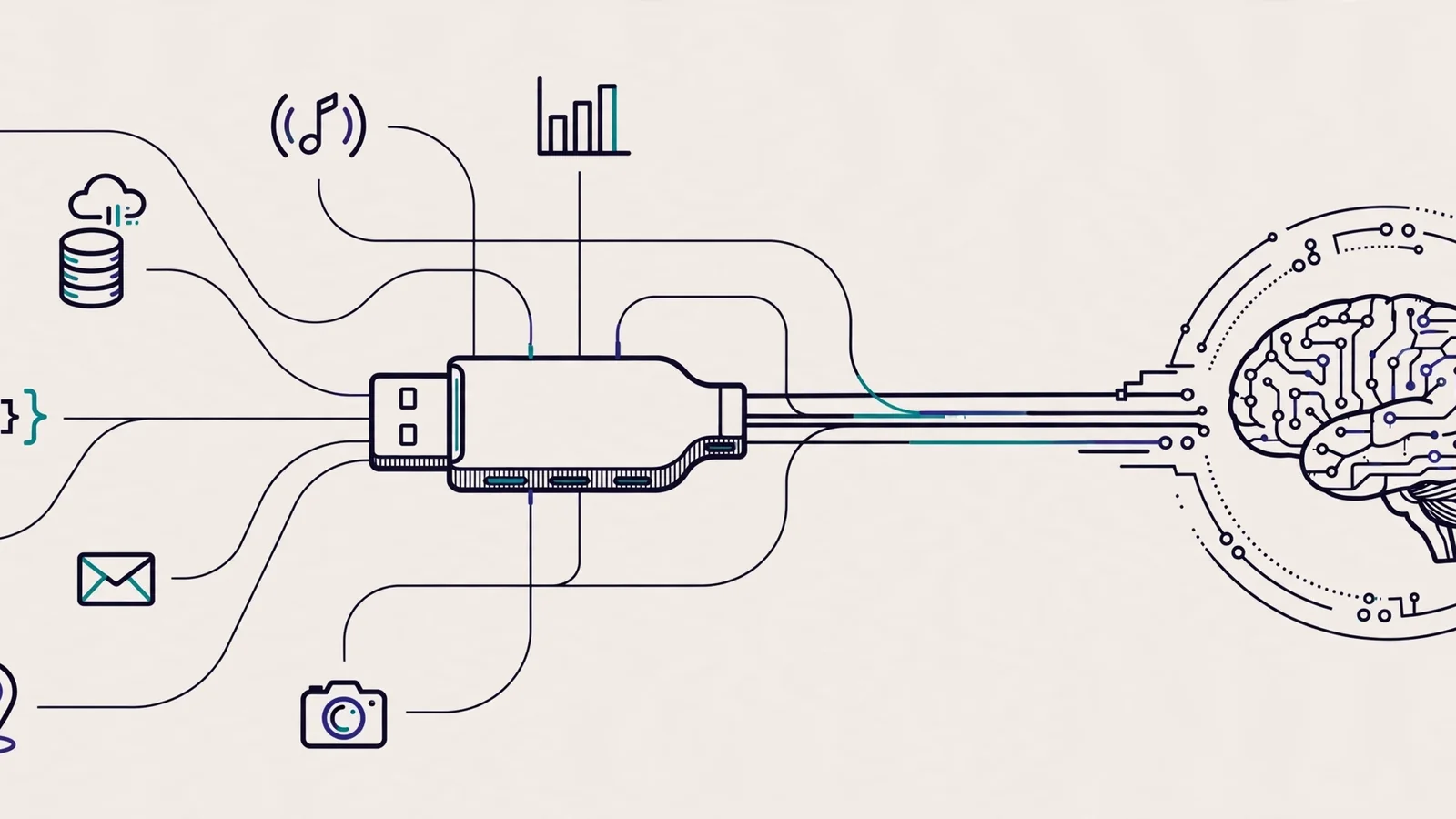
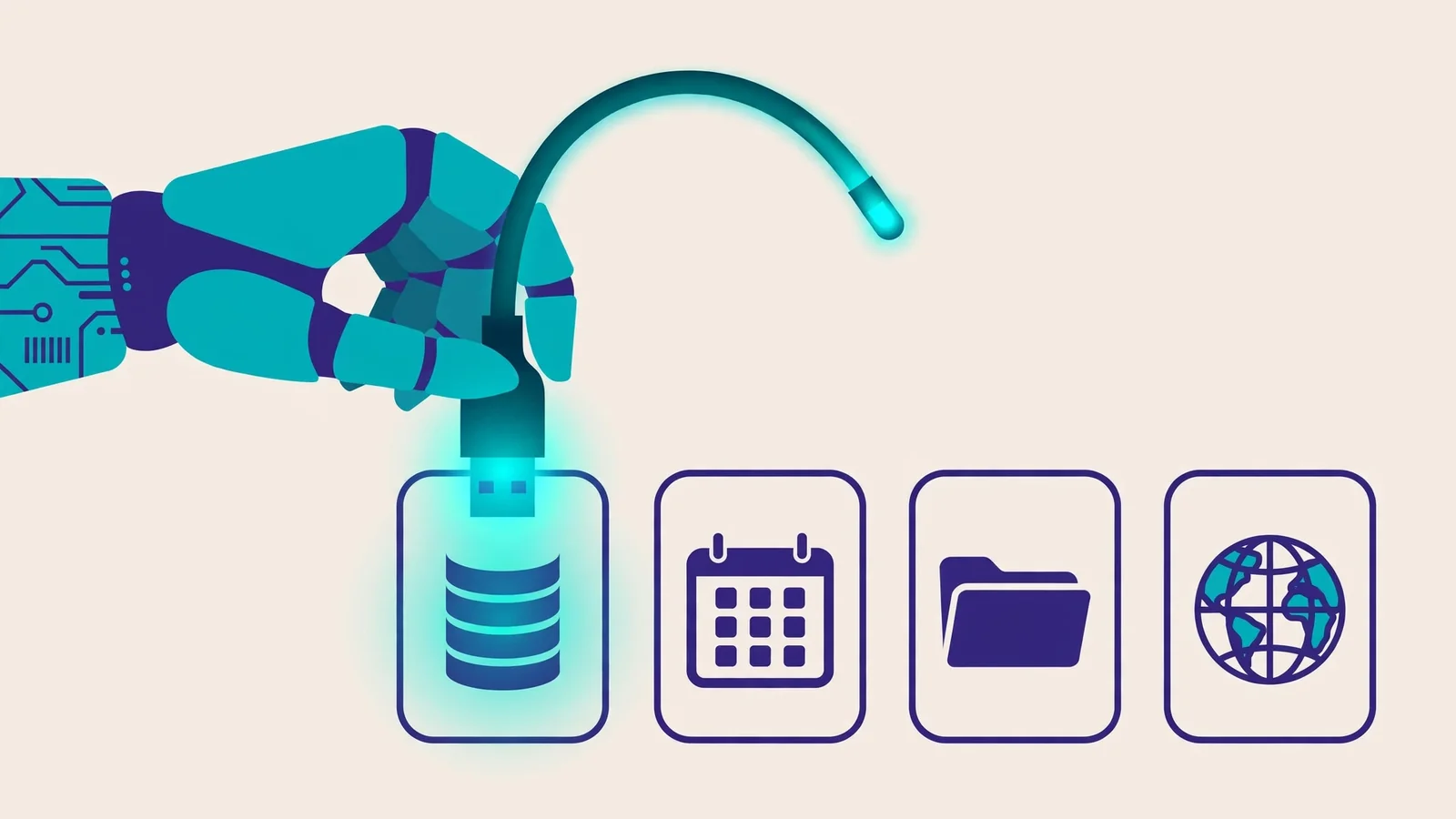
The official documentation uses a fitting analogy: MCP is a USB-C port for AI applications. Just as USB-C provides one standardized way to connect electronic devices, MCP provides one standardized way to connect AI applications to external systems. A vendor that builds one MCP server never has to rebuild the integration for every AI assistant — build once, integrate everywhere.
Why MCP matters for AI agents
A useful AI agent is more than a model that strings words together well. An agent has to act: read the relevant context, call the right functions, and execute steps in sequence until the job is done. Without a standard way to reach the outside world, every new capability means a new bespoke integration.
Before MCP, this was an N×M problem. Every AI application that wanted to talk to a database, a calendar, or an issue tracker built its own connector — and every connector had to be rebuilt for every AI application. Anthropic shipped tool use in one format, OpenAI shipped function calling in another, Google in yet another. The same integration work got done over and over.
MCP collapses that to N+M: each AI application speaks MCP, each tool exposes an MCP server, and the two can discover each other. Per figures Anthropic reported in December 2025, there are already more than 10,000 public MCP servers, and the protocol is supported in Claude, ChatGPT, Visual Studio Code, and Cursor.
For developers, that means dramatically shorter integration time. For users, it means assistants that can actually touch their systems instead of just talking about them.
How MCP works: the client-server architecture
MCP uses a straightforward client-server architecture with three clearly defined roles. Understanding these three roles is the key to understanding the whole protocol.
Three roles: Host, Client, Server
- MCP Host is the AI application you use — Claude Desktop, Claude Code, ChatGPT, or VS Code, for example. The host runs the model, manages the conversation, and coordinates one or more MCP clients.
- MCP Client is the connector inside the host that talks to a single MCP server. A host creates one client per server it connects to, and each client maintains a dedicated connection to its server.
- MCP Server is the program that provides context to clients. Servers can run locally on the same machine (a filesystem server, for instance) or remotely on the provider's infrastructure (like the official Sentry server running on Sentry's platform).
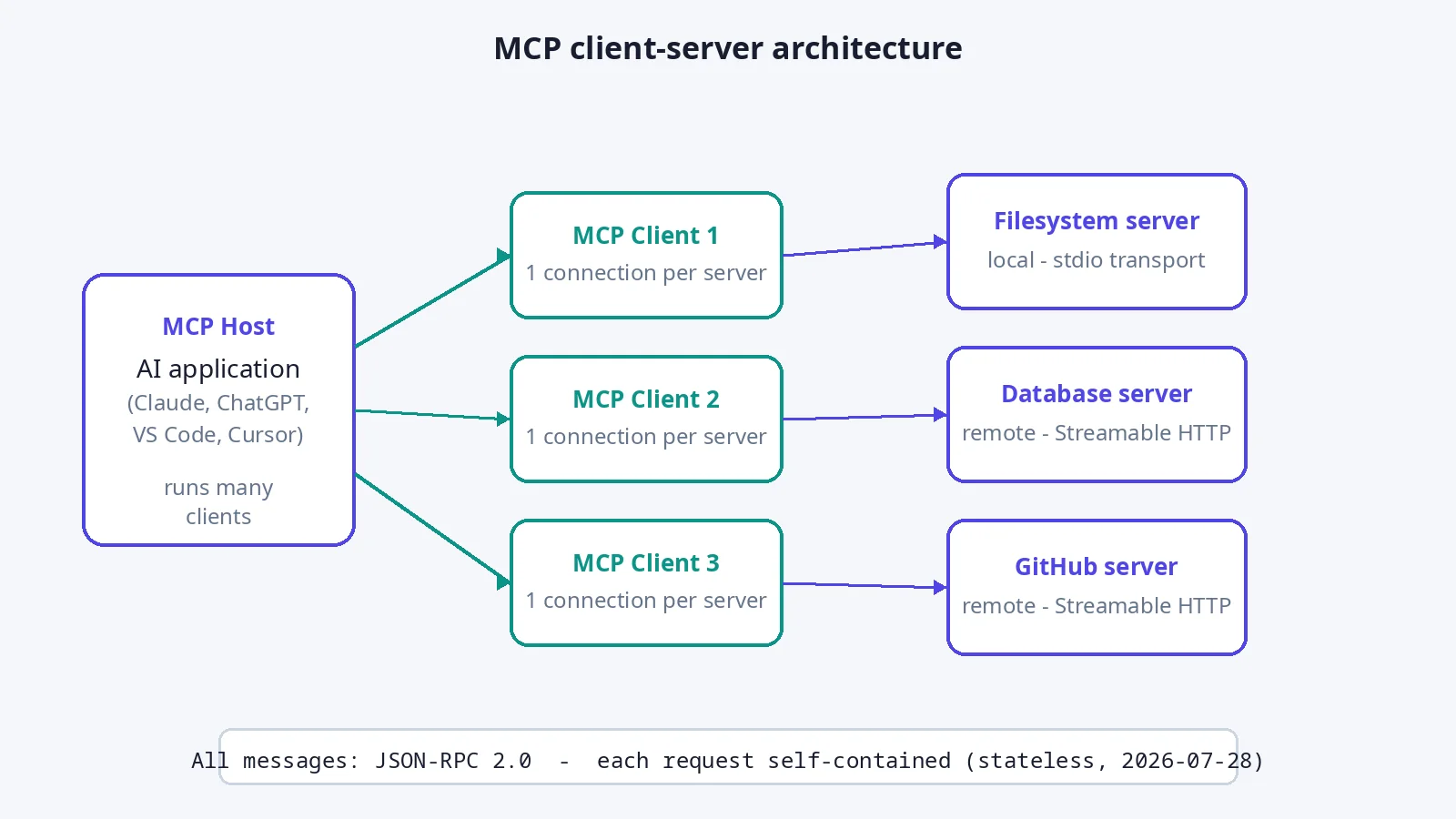
One important nuance: "server" here refers to the program serving context data, not a physical machine. Local servers using the stdio transport typically serve a single client, while remote servers using Streamable HTTP can serve many clients at once.
For the model to pick the right tool from a server's list, tool descriptions must be written clearly — this is where instruction quality matters, and solid prompt engineering techniques make a measurable difference to agent reliability.
Two layers: data and transport
The protocol has two layers. The data layer is the inner layer: a JSON-RPC 2.0-based exchange protocol defining message structure and semantics — discovery, capabilities, and core primitives like tools, resources, and prompts. The transport layer is the outer layer: the communication mechanism handling connection setup, message framing, and authorization.
Since specification version 2026-07-28, the protocol core is stateless: every request carries the protocol version and the metadata relevant to that request in its _meta field, so a server can process each request on its own with no session state. Clients discover a server's capabilities through the server/discover request before anything else. This change simplifies server deployment, especially for remote servers that must serve many clients.
The three core primitives: Tools, Resources, Prompts
Primitives are the most important concept in MCP. They define what kinds of contextual information can be shared with AI applications and what actions can be performed. Servers can expose three core primitives:
Tools: functions the model can call
Tools are executable functions an AI application can invoke to perform actions — file operations, API calls, database queries. Clients discover them via tools/list and execute them via tools/call. Tools are the most-used primitive, because this is where "the agent can act" becomes real. Tool calls generally need user approval, especially for actions that change state.
Resources: data for context
Resources are data sources that provide contextual information to AI applications — file contents, database records, API responses. Clients discover them via resources/list and read them via resources/read. The difference from tools: resources are passive (read, not executed) and typically application-driven — the model doesn't decide on its own when to fetch a resource; the application supplies it as context.
Prompts: ready-made interaction templates
Prompts are reusable templates that structure interactions with the model — a specialized system prompt or few-shot examples for using a particular set of tools, for example. Clients discover them via prompts/list and fetch them via prompts/get. This primitive standardizes workflows: instead of every user composing instructions from scratch, the server ships tested templates. The idea pairs naturally with the craft of writing good system instructions, as covered in the prompt engineering guide.
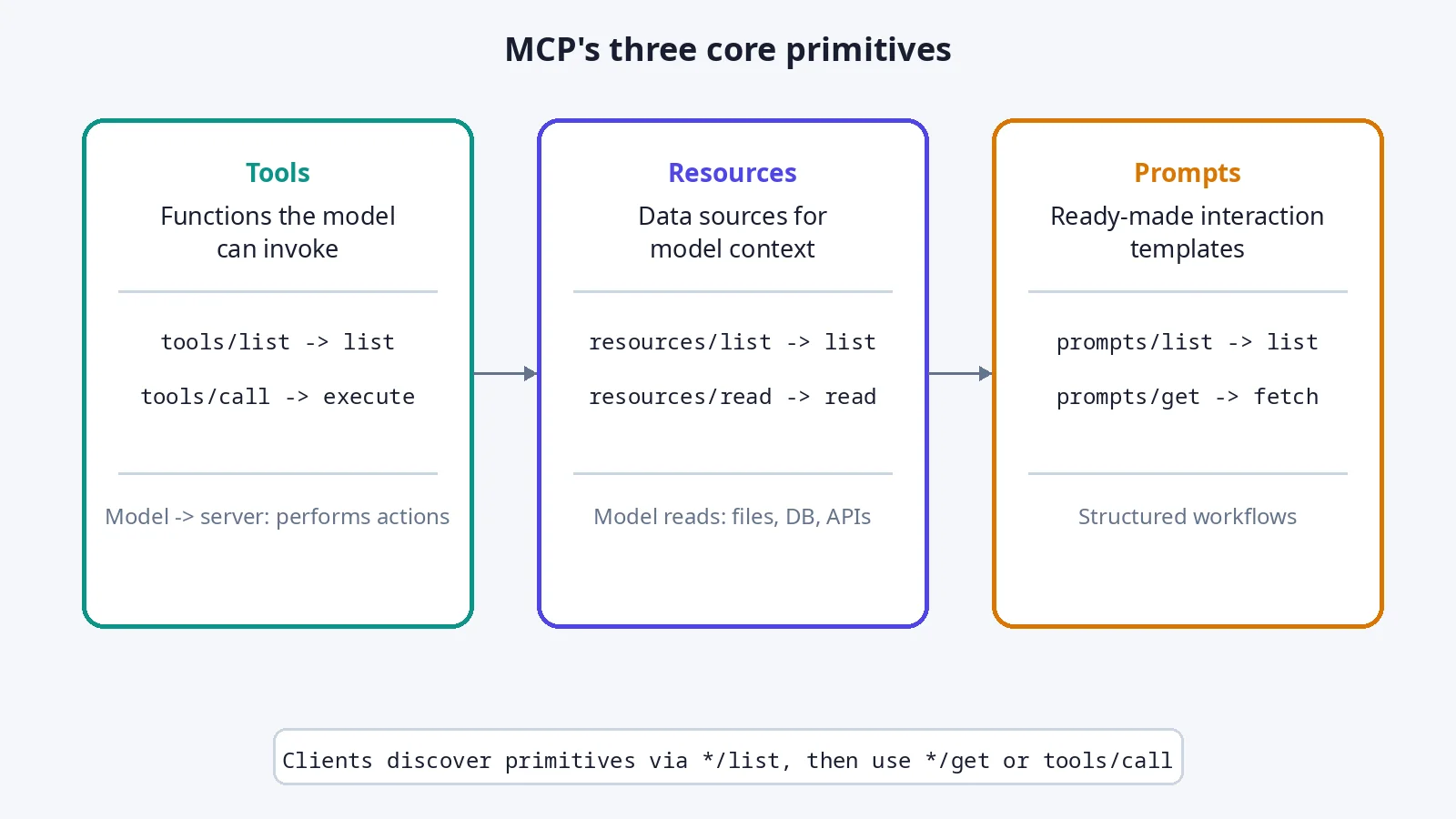
| Primitive | Primary direction | Methods | Example |
|---|---|---|---|
| Tools | Model invokes server | tools/list, tools/call |
get_forecast, create_issue |
| Resources | Server provides data | resources/list, resources/read |
Database schema, file contents |
| Prompts | Server provides templates | prompts/list, prompts/get |
Code-review template |
Beyond server primitives, the protocol also defines client-side primitives. Elicitation lets a server request additional input from the user — a confirmation before a sensitive action, for example. Note that sampling (a server requesting model completions through the client) has been deprecated since version 2026-07-28; new implementations should integrate directly with an LLM provider's API instead.
Transports: stdio vs Streamable HTTP
MCP supports two transport mechanisms, and the right choice depends on where the server runs:
| Aspect | Stdio | Streamable HTTP |
|---|---|---|
| How it works | Local process communication over stdin/stdout | HTTP POST client-to-server, optional Server-Sent Events for streaming |
| Use for | Local servers on the same machine | Remote servers serving many clients |
| Overhead | Minimal, no networking | Standard HTTP overhead |
| Authentication | Not applicable (local process) | Bearer tokens, API keys, custom headers; OAuth recommended |
The rule of thumb is simple: if the server touches things that only exist on the user's machine (local files, CLIs, local databases), use stdio and let the host launch the server as a subprocess. If the server is a shared service — an official SaaS integration, say — use Streamable HTTP and secure it with OAuth.
One hard rule for stdio servers: never write to stdout. Stdout is the JSON-RPC message channel, so console.log() or print() will corrupt messages and break the server. Log to stderr instead (console.error() in Node.js, the logging module in Python).
Tutorial: building your first MCP server
This section follows the flow of the official guide to building an MCP server. We'll build a small weather server in TypeScript that exposes one tool, then connect it to a host.
1. Set up the project
You need Node.js 20 or newer. Create a project folder, initialize npm, and install the official SDK:
mkdir weather-server && cd weather-server
npm init -y
npm install @modelcontextprotocol/sdk zod
Add "type": "module" to package.json and a standard tsconfig.json for an ESM project.
2. Write the server
Create src/index.ts. The SDK provides a high-level McpServer class — the description and input schema you write automatically become the tool definition the model reads:
import { McpServer } from "@modelcontextprotocol/sdk/server/mcp.js";
import { StdioServerTransport } from "@modelcontextprotocol/sdk/server/stdio.js";
import { z } from "zod";

const server = new McpServer({
  name: "weather-server",
  version: "1.0.0",
});

server.registerTool(
  "get_forecast",
  {
    description: "Get the weather forecast for a city",
    inputSchema: {
      city: z.string().describe("City name, e.g. Jakarta"),
    },
  },
  async ({ city }) => {
    // Replace with a real weather API call
    const forecast = { city, condition: "sunny", tempC: 29 };
    return {
      content: [{ type: "text", text: JSON.stringify(forecast) }],
    };
  },
);

const transport = new StdioServerTransport();
await server.connect(transport);
Three things to notice: the tool name uses descriptive snake_case, the description explains when to use the tool (the model reads this to decide), and the input schema uses Zod so argument validation is automatic. No console.log() anywhere — use console.error() for debugging.
3. Build and test with the MCP Inspector
npm run build
The SDK ships the MCP Inspector — the official tool for testing a server without a host. Point the Inspector at your stdio server, call tools/list to confirm get_forecast shows up, then tools/call to execute it. If the tool list comes back empty, the cause is almost always a forgotten build step or a wrong path.
4. Connect it to a host
For Claude Desktop, open the configuration file (~/Library/Application Support/Claude/claude_desktop_config.json on macOS) and register the server under the mcpServers key:
{
  "mcpServers": {
    "weather": {
      "command": "node",
      "args": ["/ABSOLUTE/PATH/TO/weather-server/build/index.js"]
    }
  }
}
Save, restart Claude Desktop, and the server launches automatically as a subprocess. Now ask "What's the weather in Jakarta?" — the model will discover get_forecast via tools/list, supply the city argument, execute it via tools/call, and answer from the result.
The message flow: from discovery to tools/call
To make it concrete, here's the message sequence when a model uses a tool from a server. Every message uses the JSON-RPC 2.0 format:
- Discovery — the client sends
server/discoverto learn the server's protocol versions and capabilities. - Listing — the client calls
tools/listand receives the tool catalog with input schemas. - Model decision — the model reads the tool descriptions, picks the right tool for the user's request, and assembles the arguments.
- Execution — the client sends
tools/call:
{
  "jsonrpc": "2.0",
  "id": 1,
  "method": "tools/call",
  "params": {
    "name": "get_forecast",
    "arguments": { "city": "Jakarta" }
  }
}
- Result — the server returns the result, the host passes it to the model, and the model composes the final answer for the user.
The same pattern holds for resources (resources/list then resources/read) and prompts (prompts/list then prompts/get). Because every request is self-contained (stateless), servers keep no session state between requests — which is what makes MCP servers easy to scale horizontally.
MCP security you should know
An open standard isn't automatically a secure one — MCP security is in the hands of server and host builders. Best practices from the official security documentation:
- User approval for tool calls. A good host always asks for confirmation before running a state-changing tool. Never build a client that silently executes destructive tools.
- Least privilege. A filesystem server, for example, should be scoped to specific directories — not the whole disk. Each tool should be able to do exactly what its description says, and nothing more.
- Authentication for remote servers. The Streamable HTTP transport supports bearer tokens, API keys, and custom headers — the official docs recommend OAuth for obtaining authentication tokens.
- Validate input on the server. Don't trust model-supplied arguments blindly; validate types, ranges, and formats before executing. The Zod schema in the example above is the first line of defense, not the only one.
- Keep credentials out of code. API keys for services wrapped by a server should come from environment variables, never hardcoded.
The biggest risk is non-technical: a convincing-looking third-party MCP server can expose dangerous tools. Install servers only from sources you trust, and review the exposed tool list before granting access to sensitive data.
MCP vs custom integrations: when to use which
| Aspect | MCP | Custom per-app integration |
|---|---|---|
| Build effort | Once, works with every host | Repeated for each AI application |
| Discovery | Automatic via */list |
Manual documentation per integration |
| Transport | Standard (stdio / Streamable HTTP) | Free choice, but not interoperable |
| Control | Fully with the server author | Full, but locked to one application |
| Best for | Tools and data used by many agents | Deeply product-specific one-off integrations |
MCP doesn't replace function calling — it's a standard layer above it. Models still use their built-in tool-use mechanism; MCP standardizes how tools are discovered, described, and invoked across applications. If you're building a capability used by exactly one internal app and never reused, a custom integration is still fine. But for anything that might be shared across agents and applications, MCP is the more durable choice.
Common mistakes and how to avoid them
- Writing to stdout in a stdio server. A stray
console.log()for debugging corrupts the JSON-RPC messages. Useconsole.error()or a logger that writes to stderr or files. - Vague tool descriptions. "Get data" tells the model nothing about when to use the tool. Write descriptions like function docs: when to use it, what the inputs are, what comes back.
- Tool bloat. Exposing 50 tools leaves the model guessing which to pick and burns context budget on schemas. Split into several focused servers, each with a small surface.
- Skipping authentication on remote servers. A Streamable HTTP server without auth is a public API without auth. Apply OAuth or at least an API key.
- Still relying on sampling. The sampling primitive is deprecated since 2026-07-28 — don't design new flows on top of it; call an LLM API directly from the server if you need model completions.
- Ignoring primitive-list changes. Servers can send notifications when their tools change; a good client subscribes to these instead of caching the list forever.
Best practices for building MCP servers
- Design atomic tools. One tool does one thing well —
get_forecastbeatsdo_weather_stuff. - Write descriptions for the model, not for humans. The model decides tool usage purely from the name, description, and schema. Test by asking a model to explain when it would use your tool.
- Minimize the attack surface. Expose as little as possible; every extra tool is risk and context cost.
- Test with the MCP Inspector first before wiring up a host — iterating in the Inspector is far faster than restarting a host app.
- Version your server. Put a version in the server constructor and treat schema changes like API changes: never silently change what an argument means.
- Document for humans too. A README explaining installation, required configuration (env vars, credentials), and usage examples.
FAQ
Is MCP only usable with Claude?
No. MCP has been a vendor-neutral open standard since its donation to the Agentic AI Foundation in December 2025. The official docs name support in Claude, ChatGPT, Visual Studio Code, and Cursor — and because the specification is open, anyone can build a compatible client or server.
Does MCP replace function calling?
No — they operate at different layers. Function calling is a model's mechanism for invoking functions; MCP is the standard protocol for discovering, describing, and invoking those functions across applications. MCP makes a tool definition you write once usable by many models and apps.
Which transport should I choose: stdio or Streamable HTTP?
Use stdio for local servers running on the user's machine as a subprocess (local file access, CLIs, local databases). Use Streamable HTTP for remote servers that serve many clients and need authentication. Both use the same JSON-RPC 2.0 message format.
Is my data safe when using MCP servers?
Safety depends on the servers you install, not the protocol itself. Apply least privilege (scope each server's access as narrowly as possible), require approval before destructive tools run, use OAuth for remote servers, and install servers only from trusted sources.
How hard is it to build my own MCP server?
Not hard for simple cases. Official SDKs exist for TypeScript, Python, and other languages; a single-tool server like the one in this article is a few dozen lines of code. The hardest part is usually not the protocol — it's designing tools whose descriptions are clear enough for a model to use reliably.
Conclusion
MCP solves the most tedious problem in AI agent development: integrations rebuilt over and over for every model-tool pairing. With three clear roles (host, client, server), three core primitives (tools, resources, prompts), and two standard transports (stdio, Streamable HTTP), the protocol provides a vendor-neutral foundation — now under the Agentic AI Foundation — for connecting AI to the real world.
The most sensible next step: build one small MCP server for your own workflow — a server exposing an internal database or a favorite CLI, for example — and test it with the MCP Inspector. Once you feel how little code it takes, you'll understand why the ecosystem has grown past 10,000 public servers.
To round out your agent-building skills, read the complete prompt engineering guide as well: great tools still need clear instructions for the model to use them well. And to go straight to the source, start with the official MCP introduction.