CI/CD Pipeline Guide for Developers: From Commit to Automated Deploy
A practical guide to building CI/CD pipelines: CI vs CD concepts, a ready-to-use GitHub Actions workflow, blue-green and canary deployment strategies, and best practices for drama-free releases.
Panji Ihsanudin Fajri
14 min read0 reads
Contents
- What Is CI/CD?
- Why a CI/CD Pipeline Matters
- Faster releases without the drama
- Bugs get caught before reaching users
- Consistency across environments
- How a CI/CD Pipeline Works
- Building Your First Pipeline with GitHub Actions
- Stages of a Mature Pipeline
- Layered testing
- Separate environments: staging before production
- Automated security scanning
- Notifications that are not noisy
- Deployment Strategies: From Simple to Safe
- Common Pipeline Mistakes
- CI/CD Best Practices
- FAQ
- What is the difference between continuous delivery and continuous deployment?
- How long should an ideal CI/CD pipeline take?
- Is CI/CD only for large teams?
- How do I store credentials safely in a pipeline?
- Do I need to learn Kubernetes for CI/CD?
- Conclusion
Deploying used to mean an all-nighter. Code got merged on a Friday afternoon, then the team gathered around waiting for a manual deploy process that might finish at some point — or fail halfway through and need an equally manual rollback. If you have lived through that, you know how exhausting releases without automation can be.
A CI/CD pipeline turns that process into a boring routine — in the best possible sense. Every time code is pushed, a series of steps runs on its own: the code gets built, tests run, vulnerabilities get scanned, and if everything passes, the app deploys itself to production. What once took half a day and three people now finishes in minutes with no human intervention.
This article covers CI/CD pipelines from zero to production-ready: what separates CI from CD, how a pipeline actually works, a GitHub Actions workflow example that genuinely runs, safe deployment strategies, common mistakes, and the best practices used by serious teams.
Summary: CI (Continuous Integration) merges code frequently and verifies it automatically; CD (Continuous Delivery/Deployment) takes code that passed verification to production automatically or with one click. A good pipeline has build, test, security scan, and deploy stages with separate environments. GitHub Actions is the easiest starting point for GitHub repos. Deployment strategies like blue-green and canary reduce release risk. Dependency caching and parallel tests keep pipelines fast.
What Is CI/CD?
CI/CD stands for Continuous Integration and Continuous Delivery (or Continuous Deployment — both abbreviated CD, and the difference matters). Continuous Integration means every code change pushed to the repository gets merged and verified automatically through builds and tests. Continuous Delivery means code that passes verification is always in a releasable state, one button away from production. Continuous Deployment goes further: no button at all, passing code deploys automatically.
The three work as one chain. CI without CD gives you tested code that piles up without ever shipping. CD without CI means automatic deploys of code that might not even work. A CI/CD pipeline is the concrete implementation: a configuration file defining each stage, triggers that run it, and environments where those stages execute.
Why a CI/CD Pipeline Matters
Faster releases without the drama
Research from DORA (DevOps Research and Assessment), published by Google Cloud, shows teams with strong deployment practices can ship multiple times a day, while slow teams need weeks or months for a single release. The main difference is not team size — it is how automated their pipeline is. Small, frequent deploys are far safer than rare, massive ones: when something breaks, the cause is easy to trace because the change set is small.
Bugs get caught before reaching users
Most bugs that escape to production could have been caught by a machine. Automated tests in the pipeline run on every push, so code that breaks something already working gets rejected before it can merge. Catching a bug during development is far cheaper than fixing it after release — especially when you learn about it from an angry user report.
Consistency across environments
A classic source of pain is "it works on my machine." A CI/CD pipeline builds the app in a clean, identical environment every time, so build results never depend on a developer's laptop state. The same artifact — the same Docker image, the same bundle — that passed tests is what gets deployed to staging and then production. No more manual rebuilds that silently differ in content.
How a CI/CD Pipeline Works
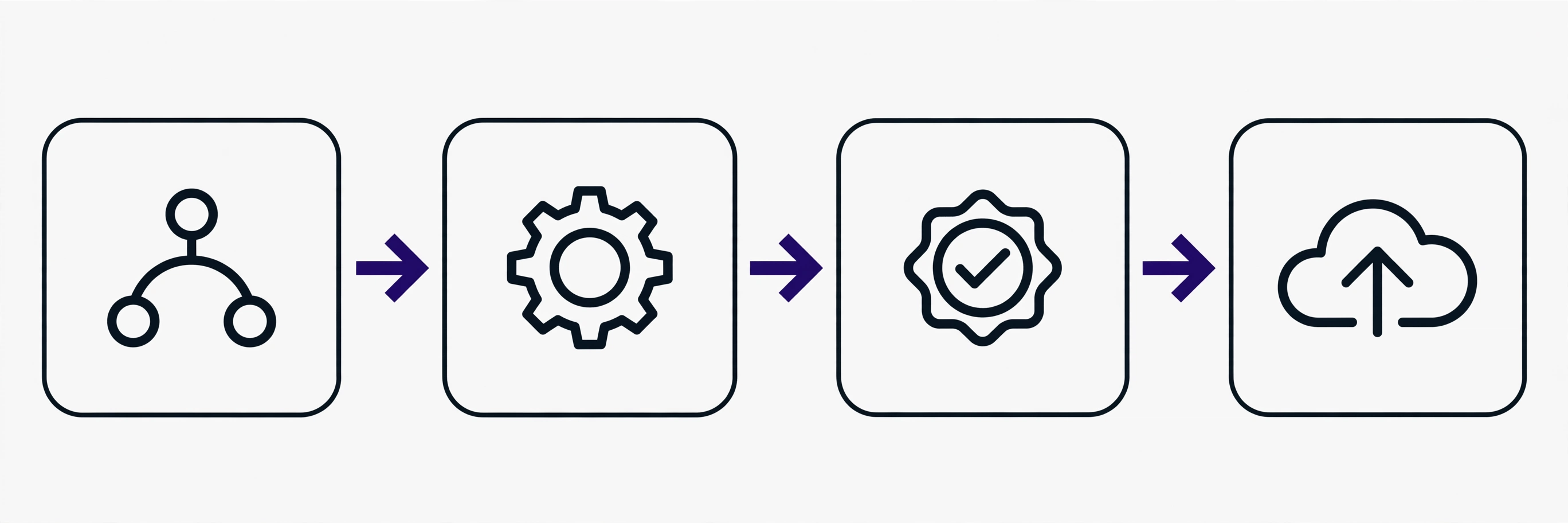
A pipeline starts from a single trigger: usually a push to a branch, a pull request, or a schedule. Once triggered, a runner — a temporary virtual machine provided by the CI platform — executes the following stages in order:
- Checkout and setup. Code is pulled from the repository, then the environment is prepared: the right language version, dependencies installed, cache restored so installation does not start from zero.
- Build. Code gets compiled or bundled. For web apps, this stage produces a deploy-ready artifact: a Docker image, static files, or an app package. If the build fails, the pipeline stops here — there is no point testing code that does not even compile.
- Automated tests. Unit tests, integration tests, and sometimes end-to-end tests run. Many teams also add linting and type checking at this stage. Slow tests can run in parallel so the pipeline does not take hours.
- Security scan. Dependencies get scanned for known vulnerabilities (via
npm auditor Snyk, for example), sometimes plus static analysis for dangerous code patterns. Small teams often skip this stage, even though it is cheap and high-value. - Deploy. The artifact that passed every stage ships to the target environment: staging first, then production. This is where deployment strategies like blue-green or canary come in.
Every stage's result is reported back to the pull request as a status check. Developers immediately see whether their PR is green or red without asking anyone. Branches that are red can be configured to block merging — a simple rule that keeps broken code out of the main branch.
Building Your First Pipeline with GitHub Actions
GitHub Actions is the most sensible starting point if your code already lives on GitHub: no extra server needed, built-in integration, and 2,000 free runner minutes per month for private repos (public repos are unlimited). Workflows are defined as YAML files in .github/workflows/ — the full syntax reference is in the GitHub Actions documentation.
The following is a complete workflow for a Node.js app: install dependencies with caching, run lint and tests, build, then deploy to a VPS over SSH only when pushing to the main branch.
name: CI/CD Pipeline

on:
  push:
    branches: [main]
  pull_request:
    branches: [main]

jobs:
  build-and-test:
    runs-on: ubuntu-latest
    steps:
      - name: Checkout code
        uses: actions/checkout@v4

      - name: Setup Node.js
        uses: actions/setup-node@v4
        with:
          node-version: 20
          cache: npm

      - name: Install dependencies
        run: npm ci

      - name: Lint
        run: npm run lint

      - name: Run tests
        run: npm test

      - name: Build
        run: npm run build

  deploy:
    needs: build-and-test
    if: github.event_name == 'push'
    runs-on: ubuntu-latest
    steps:
      - name: Deploy to VPS
        uses: appleboy/ssh-action@v1
        with:
          host: ${{ secrets.VPS_HOST }}
          username: ${{ secrets.VPS_USER }}
          key: ${{ secrets.VPS_SSH_KEY }}
          script: |
            cd /opt/myapp
            git pull origin main
            npm ci --omit=dev
            npm run build
            pm2 restart myapp
A few things worth noting. First, npm ci instead of npm install, because ci installs exactly what package-lock.json specifies — deterministic results. Second, the deploy job declares needs: build-and-test, so deployment never runs when tests fail. The if: github.event_name == 'push' condition ensures deploys only happen on pushes to main, not on pull requests — you do not want every experimental PR deploying to production. Third, SSH credentials live in GitHub Secrets, not in the YAML file. Secrets never appear in logs, and forked workflows cannot access them.

For containerized apps, a cleaner pattern is building the Docker image in the pipeline, pushing it to a registry, then deploying that image. That way the artifact you tested is exactly the artifact running in production — a principle also covered in the Docker guide for developers.
Stages of a Mature Pipeline
The example above is enough to start, but production pipelines usually add a few more stages:
Layered testing
Do not cram every test into one giant job. Separate unit tests (fast, run on every push), integration tests (need a database or other services — use service containers on the runner), and end-to-end tests (slow, run only before merging to main or on a nightly schedule). GitHub Actions supports matrix builds to run tests across multiple Node.js versions or operating systems at once:
strategy:
  matrix:
    node-version: [18, 20, 22]
    os: [ubuntu-latest, windows-latest]
Separate environments: staging before production
Do not deploy straight to production from main with no intermediate step. The standard pattern: pushes to main auto-deploy to staging (a production-like environment for final verification), then production deployment needs manual approval or happens automatically after staging smoke tests pass. GitHub Actions offers environments with protection rules — for instance, production deploys must be approved by a specific person.
Automated security scanning
Add a job that scans dependencies:
- name: Security audit
  run: npm audit --audit-level=high
The pipeline fails if high or critical vulnerabilities are found. For serious applications, consider Snyk or Dependabot, which can open automated PRs to update vulnerable dependencies. This stage is cheap — it runs in seconds — but it closes the gaps most commonly exploited.
Notifications that are not noisy
A failing pipeline should notify the right people, but not spam the whole team on every failure. A practical rule: notify the team channel only for failures on the main branch or deploy failures; feature-branch failures can surface as status checks on their PRs. GitHub Actions can send Slack or Discord notifications via webhook in a conditional final step (if: failure()).
Deployment Strategies: From Simple to Safe
How new code replaces old code in production determines how risky each release is. Here are the common strategies, from simplest to safest:
| Strategy | How it works | Strengths | Weaknesses |
|---|---|---|---|
| Recreate | Shut down the old version, start the new one | Simplest | Downtime during switchover |
| Rolling | Replace instances one by one | No downtime, easy | Slow rollback, mixed versions temporarily |
| Blue-green | Two identical environments, switch traffic at once | Instant rollback, no downtime | Needs 2x resources |
| Canary | Release to a small subset of users first | Minimal risk, test on real traffic | Needs traffic-splitting and per-version monitoring |
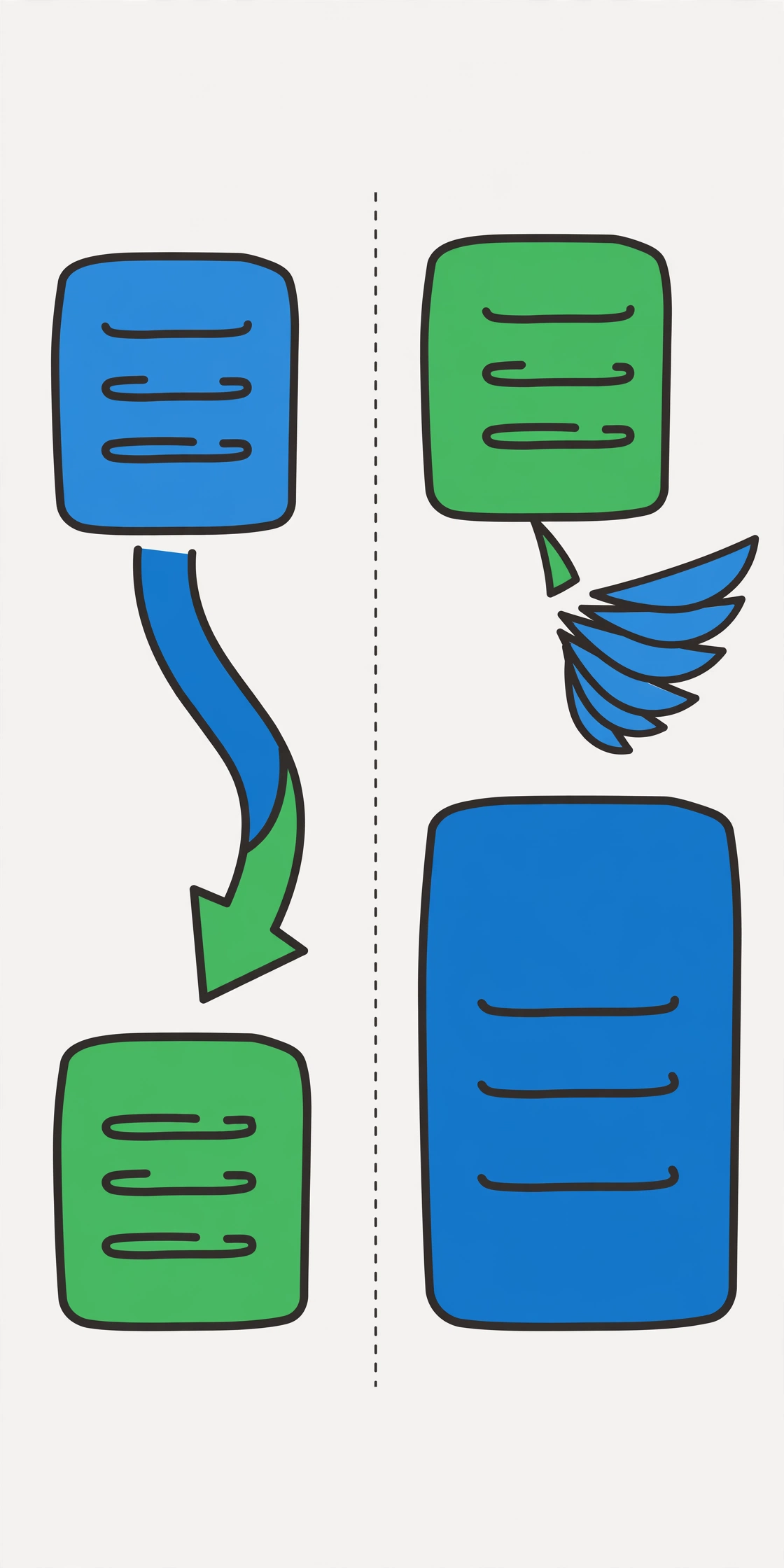
Blue-green deployment prepares two identical environments: blue (currently live) and green (about to go live). The new version deploys to green, gets tested, then traffic switches from blue to green all at once. If something goes wrong, traffic flips back to blue within seconds. This strategy suits applications that cannot tolerate any downtime.
Canary deployment is more gradual: the new version initially receives only 5–10% of traffic. If error metrics and latency stay healthy during the observation window, the share ramps up until it reaches 100%. If not, the new version gets shut down without ever touching most users. This needs a load balancer capable of traffic splitting and monitoring that can separate metrics per version.
For small teams, rolling deployment with one or two instances is usually enough — especially with properly containerized and orchestrated apps. What matters is not picking the fanciest strategy but having a rollback plan that has been tested before it is needed. A rollback you have never tried is the same as having no rollback.
Common Pipeline Mistakes
A pipeline so slow nobody cares. A 45-minute pipeline makes developers ignore it — they merge without waiting for results. A healthy target: unit-test feedback under 10 minutes. How: cache dependencies, run tests in parallel, and move slow tests to a separate job that does not block merging.
Secrets leaking into logs. Never echo a secret for debugging, and watch out for commands that print environment variables. GitHub automatically masks registered secrets, but secrets leaked indirectly (base64-encoded first, for example) will not be masked. If a secret leaks, treat it as compromised: revoke and rotate it, do not just delete it from the log.
Deploying from feature branches. The pipeline must clearly separate the verification flow (runs on every PR) from the release flow (only from the main branch or release tags). A production deploy triggered from a random branch is an incident waiting to happen.
Unpinned third-party action versions. uses: some-action@main means your pipeline's behavior can change at any time without you changing anything. Pin to a specific version tag (@v4), or better yet a commit SHA for critical actions. A small detail that separates reproducible pipelines from mysterious ones.
Ignoring a red pipeline. Branch protection rules that block merging on failed status checks only work if the team respects them. If the culture is "just merge, we will fix it later," the pipeline is expensive decoration. Make a green pipeline a non-negotiable merge requirement.
CI/CD Best Practices
- Small and often. Small, frequent deploys are far safer than rare, massive ones. Push the team to merge into
mainat least once a day — this is the real core of continuous integration. - Pipeline as code. CI/CD workflows live in the same repository as the application code, reviewed through PRs like any other code. No pipeline configuration exists only in someone's head or on an undocumented dashboard.
- Build once, deploy many times. The artifact built once gets used for every environment. Do not rebuild separately for staging and production — you lose certainty that what you tested is what you deployed. This matches the build, release, run principle from the twelve-factor app.
- Fast feedback loop. Order stages from fastest and most likely to fail first: lint and unit tests before integration tests, tests before the heavy image build. Developers hear bad news sooner.
- Observability after deploy. The pipeline is not done when the deploy succeeds. Run automated health checks after deployment and alert if the error rate rises within the first 15 minutes. Deploying without monitoring is like driving with your eyes closed — you might arrive, but only by luck.
- Document how to run the pipeline locally. Developers should be able to run the important stages (lint, test, build) on their laptops before pushing. CI is a safety net, not a replacement for verifying your own code.
This topic connects with the REST API design guide — APIs designed with good versioning make deployments far safer — and the developer workflow with AI coding assistants, which covers speeding up the code writing that the pipeline then verifies.
FAQ
What is the difference between continuous delivery and continuous deployment?
Continuous delivery keeps code always in a releasable state, but deploying to production needs manual approval (one button click). Continuous deployment removes that button: every change that passes the pipeline deploys automatically. Delivery keeps a human in the loop for the final step; deployment relies entirely on test quality. Most teams start with delivery and move to deployment once they trust their tests.
How long should an ideal CI/CD pipeline take?
For the development feedback loop (lint + unit tests + build), target under 10 minutes. A full pipeline to staging can take longer — 15–30 minutes is still reasonable. Beyond 30 minutes, that is a signal to optimize: cache dependencies, parallelize tests, or move slow tests to a separate schedule. A slow pipeline gets ignored by developers, and an ignored pipeline is the same as none.
Is CI/CD only for large teams?
Quite the opposite — small teams benefit the most. A one- or two-person team has no dedicated QA, so automated pipeline tests are the only quality gate. GitHub Actions, GitLab CI, and similar tools are free at small scale and need no self-hosted server. Starting with a 30-line workflow like the example in this article already changes how you work fundamentally.
How do I store credentials safely in a pipeline?
Use the CI platform's built-in secret store (GitHub Secrets, GitLab CI/CD variables) — never write credentials in workflow files, never commit .env files. Scope secrets as narrowly as possible (a deploy token for one repository only), rotate them periodically, and use OIDC (OpenID Connect) to authenticate with cloud providers without storing long-lived credentials at all if your platform supports it.
Do I need to learn Kubernetes for CI/CD?
No. CI/CD and Kubernetes are different things: CI/CD is about automating build-test-deploy, Kubernetes is about container orchestration. You can have a mature CI/CD pipeline deploying to a plain VPS, serverless, or a PaaS like Fly.io or Railway. Learn Kubernetes when your scale genuinely demands it, not out of FOMO.
Conclusion
A CI/CD pipeline is, at its core, automated discipline: every code change verified the same way, every time, no exceptions. Start simple — one GitHub Actions workflow running tests on every push — then grow gradually: security scanning, a staging environment, safer deployment strategies, and post-deploy monitoring.
The concrete next step: take one of your personal repositories this week, add a workflow like the example in this article, and feel the difference when every push immediately gets a green or red verdict. Once comfortable, expand into advanced topics like infrastructure as code and observability. A few hours invested in building a pipeline pays for itself many times over in manual-deploy debugging you never have to do — and you will sleep far better on every release night.